


LEADR
One ordering workflow for America’s largest landscape company — mowers, trailers and fleet trucks requested, approved and delivered without a single email chain.
Ordering a mower shouldn’t take an email chain
A nationwide landscape operator’s branches run on equipment — mowers, trailers, trucks and specialty gear ordered all year, across divisions, regions and hundreds of branches. I designed LEADR, the order-management platform that turns those requests into one guided flow: specced from a catalog, justified with structured reasons, approved against live budgets, and tracked to the invoice.
Six-figure orders, tracked in inboxes
Equipment requests travelled as emails and spreadsheets — specced differently by every branch, approved without budget visibility, and invisible from the moment they were sent until the day a truck arrived. Or didn’t.
One order object, visible to every hand that touches it
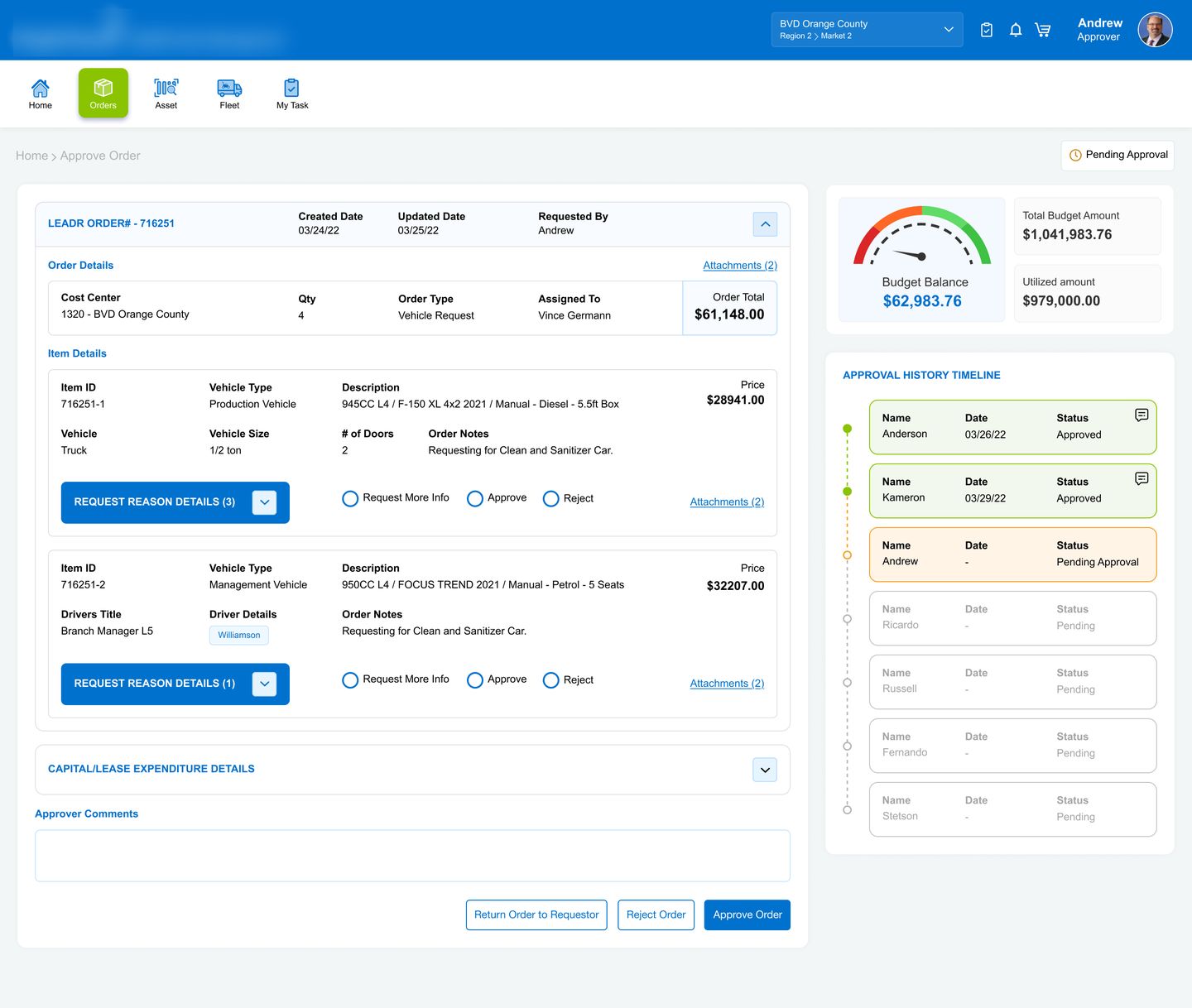
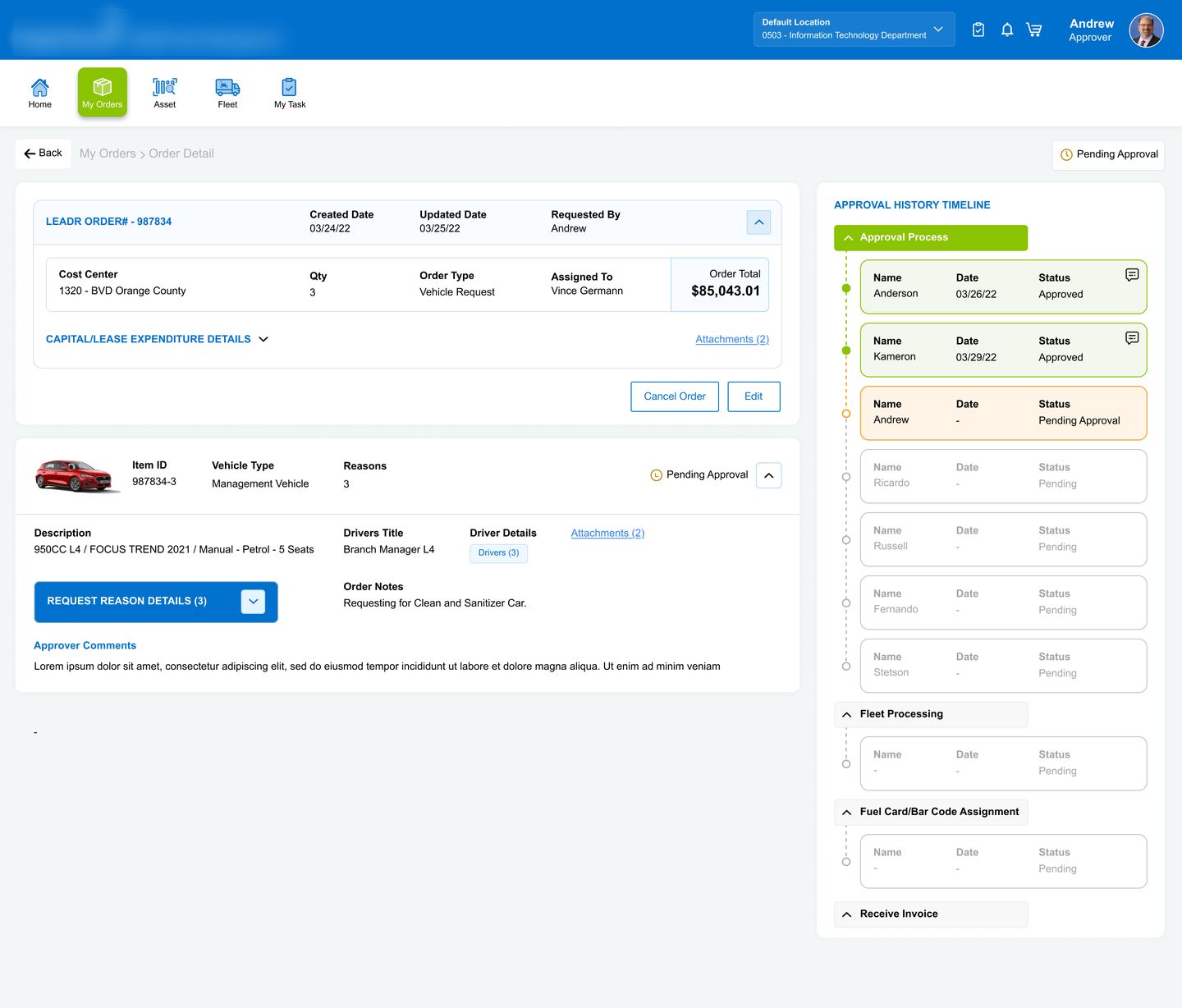
A priced spec catalog replaces free-text requests; structured reasons travel with each item; approvers decide with the budget gauge beside the button; and a live timeline shows exactly whose desk the order is on — from first approval to received invoice.
Three very different things called “an order”
A zero-turn mower, a half-ton truck and a snow plow don’t share a form. The first design decision was naming the three order types — each with its own fields, rules and approval path.
Managed Equipment
Program equipment on national accounts — mowers and trailers picked from pre-negotiated, priced specs.
SPEC# 800MLZDeck 48–72”Priced catalogVehicle Request
Fleet trucks and management vehicles — sized, doored and optioned, with drivers assigned per vehicle.
F-150 XL 4x2½ ton · 2 doorsDriver detailsNon-Standard Equipment
Everything the catalog doesn’t cover — specialty and seasonal gear that needs extra scrutiny and regional rules.
Snow plowsRegional validityExtra reviewThe alerts that used to be phone calls
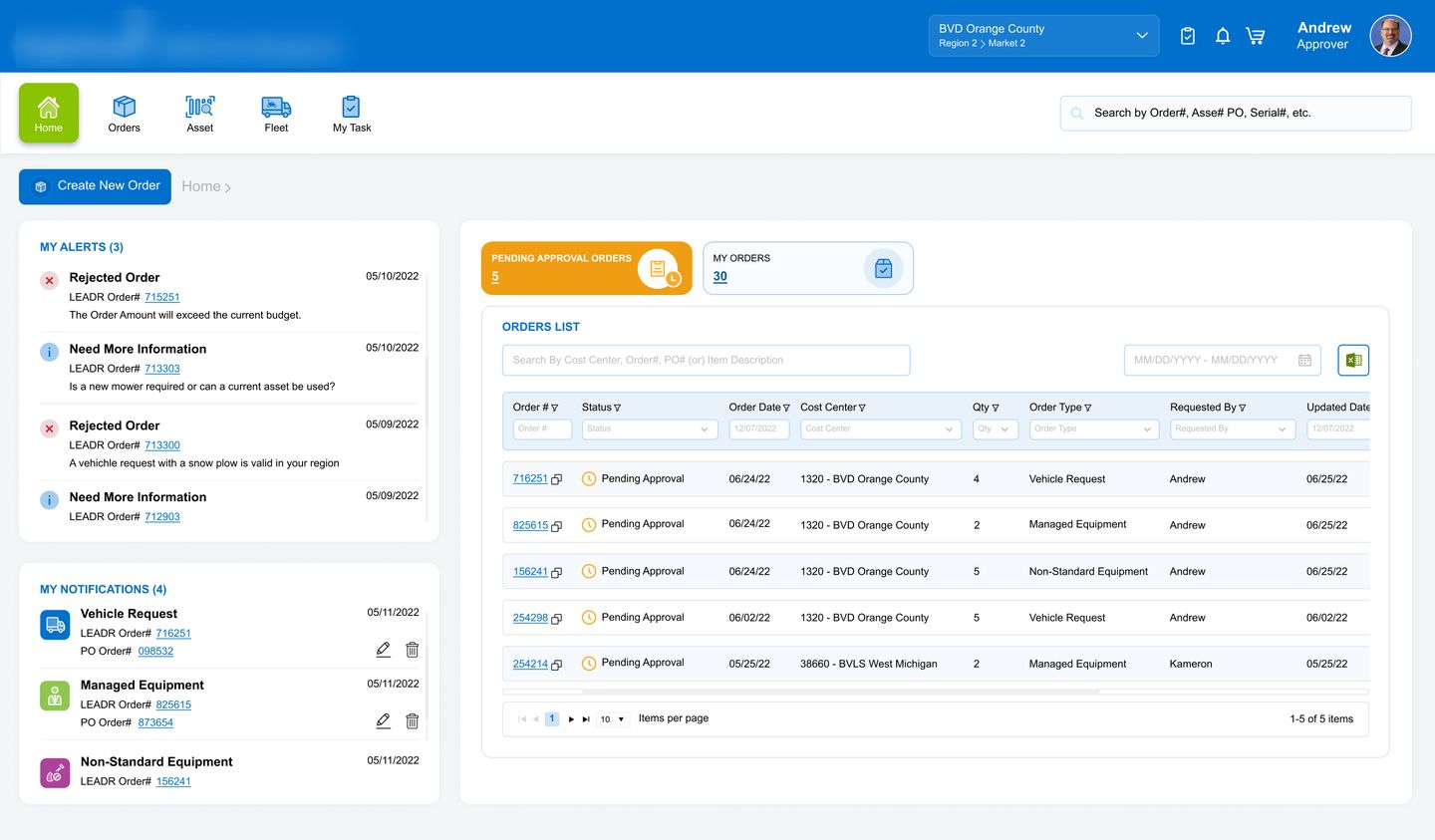
Every alert in the shipped product is a failure mode the old process hid. These four drove the design.
Budgets lived in month-end finance reports — so a request could clear three approvers and die at the last one, weeks in.
Requests arrived without the why. Approvers bounced them back over email, adding days for a one-line answer.
Between the branch and the invoice sat up to seven approvers plus fleet — and no one, including the requestor, could see where an order stalled.
Free-text requests meant fleet re-keyed and re-quoted each one — same machine, hundred descriptions, no price consistency.
An order isn’t an email — it’s a six-figure decision passing through seven hands. Give every hand the context to say yes fast, and every requestor the visibility to stop asking.
Rejectedprocess
Four hands on every order
LEADR isn’t one user’s tool — it’s a relay. The design had to serve each hand-off without slowing the runner.
Orders the season’s equipment between crews going out. Needs: a fast, guided request that can’t be filled in wrong.
Signs off dozens of orders a week across cost centers. Needs: the why, the price and the budget on one screen.
Turns approved orders into POs, fuel cards and barcodes. Needs: clean specs and attachments that arrive with the order.
Owns the capital plan the orders draw from. Needs: spend checked against budget before approval, not after.
Four decisions, approved and rejected
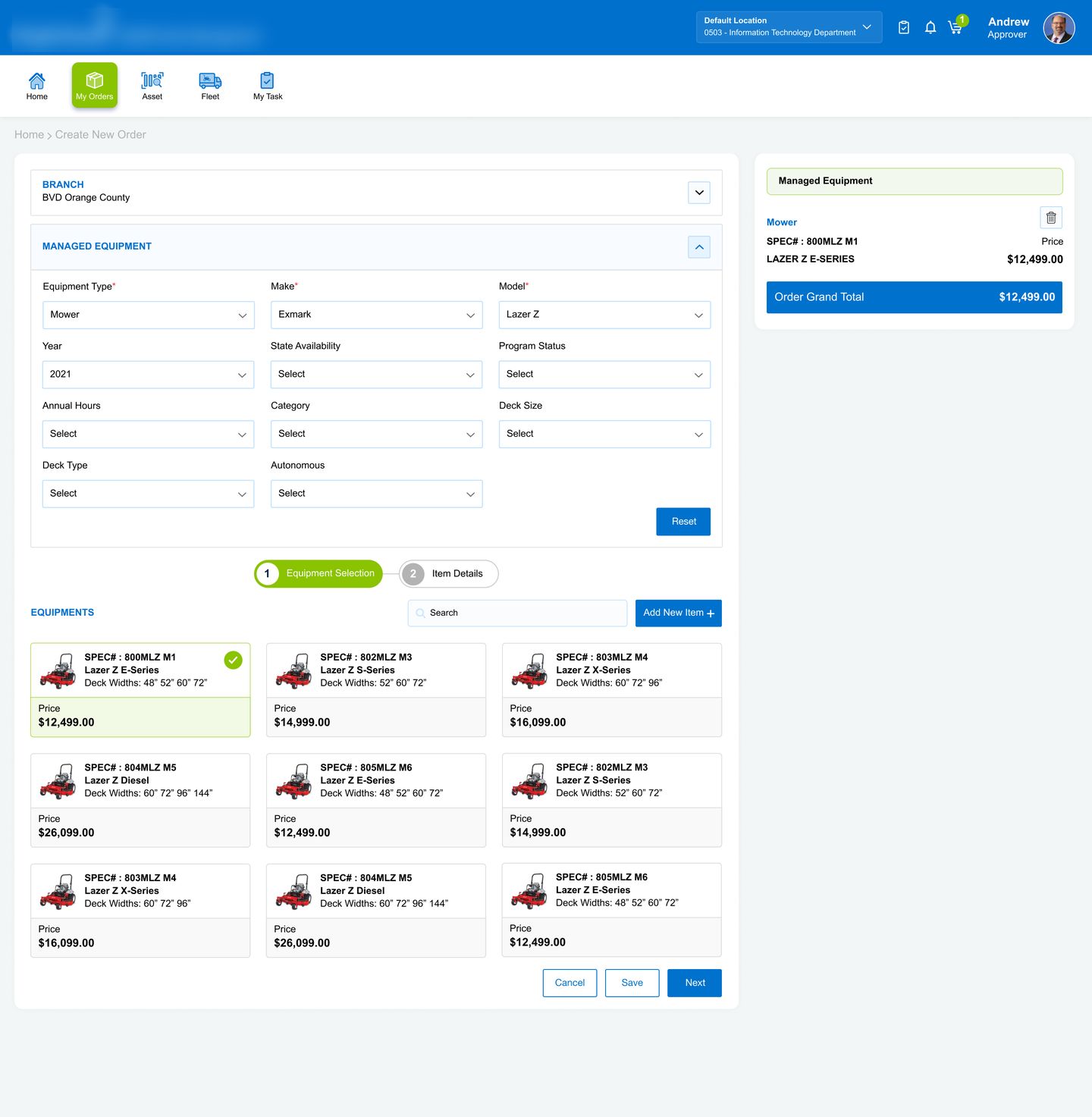
Requests start from a priced catalog
Filter by type, make and deck size, then pick a card — the spec number, description and price lock in with one click.
Infinitely flexible — and the reason fleet re-keyed and re-quoted every single request.
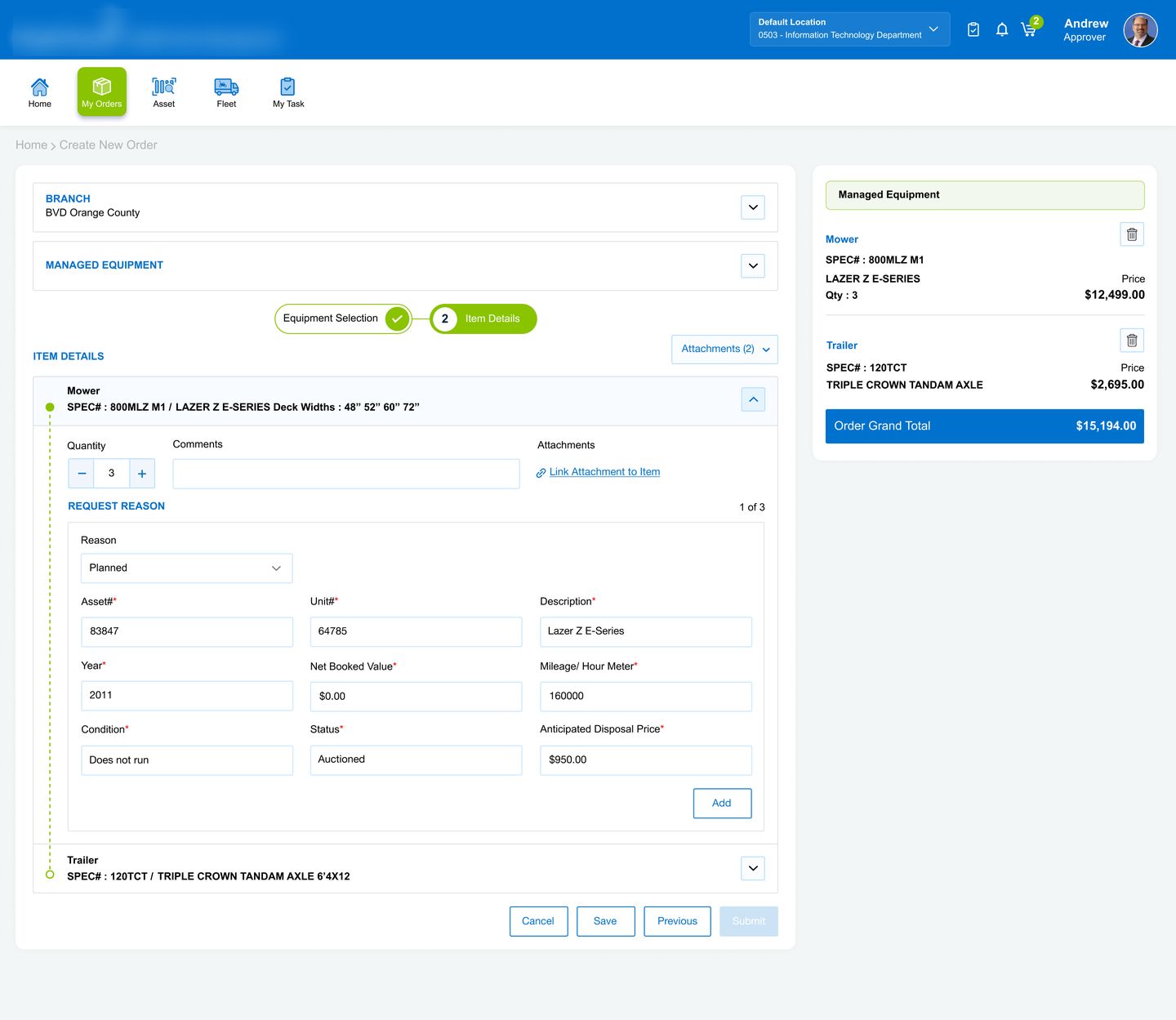
Two steps and a cart, not one long form
Mixed orders — a mower and its trailer — build up in a persistent cart with a running grand total; save as draft any time.
Simpler to build — but related items get approved separately and arrive weeks apart.
The “why” is structured, and it travels
A planned replacement names the asset, its condition and disposal price; growth names the hire. The context rides with the item to every approver.
Where the why goes to die — and the “need more information” email chain begins.
Budget lives beside the approve button
Total budget, utilized amount and remaining balance sit next to the decision — with per-item approve, reject or request-more-info.
The status quo — orders sailed through approvals and got rejected weeks later at the budget wall.
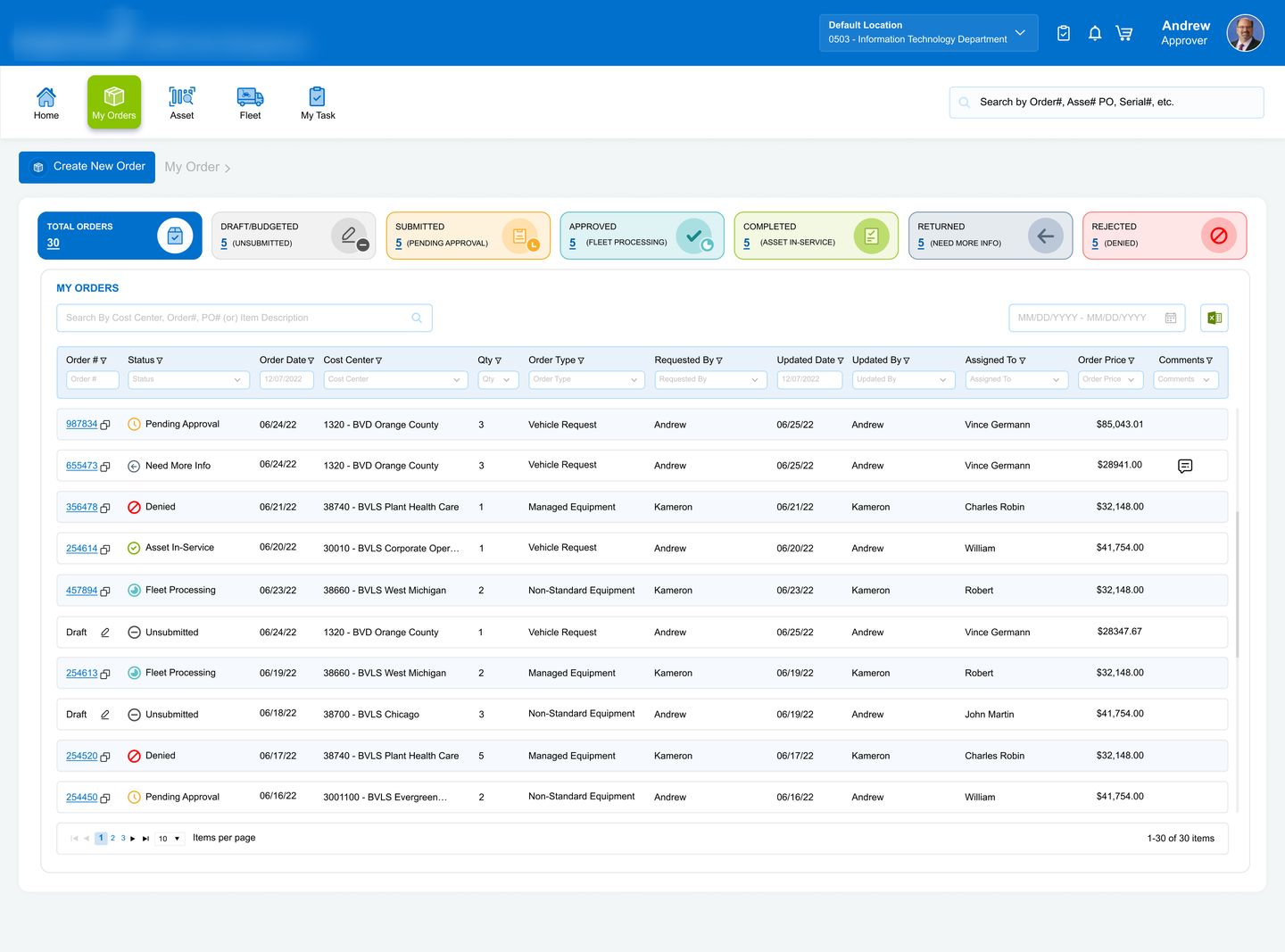
Every order wears its status
Six states carry an order from draft to in-service — the same pipeline the requestor, approver and fleet team all see, as filterable cards on My Orders and a full timeline on every order.
Built and budgeted, not yet submitted — saved mid-flow.
In the approval chain — pending each level in turn.
An approver needs more info — back with a question attached.
Denied with a reason — visible, not buried in a reply.
With fleet — PO cut, fuel card and barcode assigned.
Invoice received, asset live at the branch.
Six screens, one order’s journey
The shipped platform, following a single order from the dashboard to its approval trail — use the arrows to move between screens. Client branding is blurred for confidentiality.
The delivery note
Shipped as the ordering backbone for the client’s field operations — serving requestors, multi-level approvers, fleet processing and finance across divisions, regions and branches nationwide.
Approved